Saturday, March 21, 2009

Who bears responsibility for layoffs?

In these less-than-buoyant economic times, many technology companies are struggling to remain profitable. Some are struggling for their lives. When earnings turn negative, talk turns to cost-cutting. And since the single biggest cost of running a company is people (or should I say, the salaries, benefits, and miscellaneous costs associated with employees), inevitably the meat cleaver comes out. The result: Headcount reduction. Downsizing. Rightsizing. "Smartsizing." Redeployment. Restructuring. Reduction in force (RIF). Force shaping.

In non-Dilbertian terms: Layoffs.

Paradoxically, it costs a lot of money to let people go (in the U.S., at least). Time-Warner recently announced it would cut 1200 jobs. According to the company, the RIF will cost an estimated $100 million.

The true costs of a RIF to a company go well beyond the termination pay and other costs associated with getting rid of someone. The real costs include:
  • Brand equity costs: How much does it hurt a company's reputation as a "good place to work" when it announces layoffs?

  • Morale costs: Employees who survive the cut are often demoralized and fearful (with good reason).

  • Rehiring costs: Eventually, when (and if) things turn around, some positions will need tobe refilled.

  • Sales-disruption costs: Deals may fail to close, or a company may be eliminated from consideration during a procurement effort, if the company in question is perceived as "in trouble" due to a painful cost-cutting exercise involving layoffs. These days, procurement teams are justifiably "skittish." They want to avoid going with a company that might be perceived as a risky choice.
But where does the responsibility lie for the poor financial performance that gave rise to a RIF in the first place? In the current economic environment, it's easy to put the blame on the recession itself. And certainly, there's some truth in that. Demand is down. Credit is tight. Layoffs are, in fact, inevitable during economic downturns of the sort we're in now. But what if a company was already performing poorly before the recession? What if it has been in a negative-earnings posture for two, three, four years running?

What if you're Sun? Or Novell? Or Vignette?

The answer is pretty simple. Responsibility for a company performance ultimately rests with executive leadership: the folks at the top.

A company's success is a team effort, obviously. No one person causes a company to succeed or fail. But strategy -- and its execution -- begin at the top. It all cascades down from there. This is why the folks with CxO after their names are paid the Big Bucks. Isn't it?

Therefore, when I see a company like Sun (which is overflowing with good technology and good people) do poorly over a protracted period of time -- going back before the current recession -- I can't help but wonder why folks like Jonathan Schwartz get to keep their jobs.

Mind you, I have nothing against Schwartz. I know someone who has worked closely with him, and by all accounts he's a really nice guy. But guess what? He has failed at his job.

The same can be said for Ron Hovsepian at Novell. I know him to be a heck of a nice guy. He's smart, he's dynamic, and his heart is in the right place. But he, too, has failed miserably at his job.

The list is long.

I don't know about you, but I think people who fail in their jobs (no matter how smart they are or how personable or how great a job they did in prior lives at other companies) need to be put on probation, then ultimately (as conditions warrant) replaced. This is how it works at the bottom. This is how it works at the middle. It needs to work that way at the top.

Sure, it happens. But it's not happening fast enough.

Thursday, March 19, 2009

Developers should not be allowed to work overtime

I have a very simple tip for software companies and engineering managers who want to make their developers happier and more productive (and less likely to produce buggy code). Forbid overtime.

I give this advice based primarily on what I've observed personally (and anecdotally via friends in the industry). What I've witnessed is that people who are flogged like mules either burn out, quit their jobs unexpectedly, or (worse) stay with the company, carrying a new, sour attitude.

Conversely, I've seen that developers who are encouraged to go home at quitting time tend to do a better overall job, because they know what's expected of them (i.e., finish what you're doing by 5:00) and come to work in the morning well-rested (or at least with a reasonably positive outlook compared to their counterparts at other companies who are doing 60- or 80-hour weeks).

People who know they have to leave at 5:00 (or 6:00, etc.) tend to go to extra lengths to finish whatever it is they were working on before the clock runs out. They ramp up their productivity as necessary to get work done in the time allotted. This is what you want.

Productive employees become more productive when they have to work within time constraints, because they learn time-management skills they wouldn't otherwise learn. That sounds like a tautology, but it's true.

It works in reverse as well. You find out quickly who your less-productive people are when they're under time constraints. This is valuable info if you're a manager.

The no-overtime rule tends to enforce good project-management discipline. People become realistic about how much progress can be achieved in a given length of time and set milestone dates accordingly. If delivery goals aren't met, new dates are set (assuming there's a firm no-overtime rule) and project managers assume responsibility for the initial misjudgment. (Of course, the project managers get their time estimates from the various engineering managers, so the responsibility for missing a goal actually gets cascaded down through management.)

Without a no-overtime rule, people are expected to adjust their work day as needed in order to meet milestones, and failure to meet the goal is blamed on employees rather than management (because the underlying assumption is that if you put in enough hours, you could have made the goal). Putting the onus for lateness on regular employees rather than managers only demoralizes workers and makes them less apt to deliver on future deadlines. The right thing to do (the productive thing to do, in the long run) is let managers bear responsibility for lateness -- as they should.

When I see or hear tales of people sleeping under their desk and drinking energy drinks while they bang out code at 2:00 in the morning, I know that the company in question is poorly run and will ultimately suffer (in any number of possible ways) for making (or letting) people work crazy shifts. "But," you may be saying, "what if people are putting in those hours because they truly want to?" In my experience, people with families like to be with their families. Some people take classes at night (or need to change a baby's diapers in the middle of the night), or have ailing relatives to take care of, or have any number of other outside responsibilities. Working till dawn is not an option for some people, and in my experience most people do not choose it voluntarily. There are exceptions, of course (such as with short-staffed entrepreneurs who are trying to bootstrap a new business), but as a general rule, working till 2:00 or sleeping under your desk not only reflects bad company policy but poor personal judgment as well. (Again, though, if you're a founder of a new business, you do what you have to do. But if you know what's good for you, you won't make others work that way.)

I'm sure there are some who would say that in these troubled economic times, special measures are called for. Many companies, after all, are fighting for their very lives right now. Surely workers should expect to work overtime some of the time, until the economic storm passes?

To which I say: If your situation is so desperate that you think making people work a few extra hours is going to save the company, you're in more trouble than you think. Way more.

Wednesday, March 18, 2009

Making one line of code do the work of 47

Every year or two, I go back and re-read certain papers, presentations, and book chapters that have inspired me or been the source of priceless "Aha moments." One paper that I periodically revisit is John K. Ousterhout's Scripting: Higher Level Programming for the 21st Century, written when Ousterhout was affiliated with Interwoven. (He's currently a research professor at Stanford.)

If you're not familiar with John K. Ousterhout, it might be because you don't use Tcl (Tool Command Language, the scripting language created by Ousterhout). Sun Microsystems hired Ousterhout in 1994 specifically to accelerate the development of Tcl. It turns out that Sun's CTO at the time (the person who hired Ousterhout) was Eric Schmidt. (Yes, that Eric Schmidt.) The whole story of the creation of Tcl (an interesting tale in its own right) is told by Ousterhout here.

In any case, if you haven't yet encountered Ousterhout's excellent "Scripting" paper (originally published in IEEE Computing), I recommend that you check it out. Don't be misled by the 1998 date. It's still a very relevant paper.

Rather than argue for or against scripting languages, Ousterhout lays out the philosophy (and relative benefits) of various kinds of languages and explains, often with recourse to real-world data, why certain languages are advantageous in certain situations and others are not.

Ousterhout talks about the productivity-multiplier effect of high-level languages:
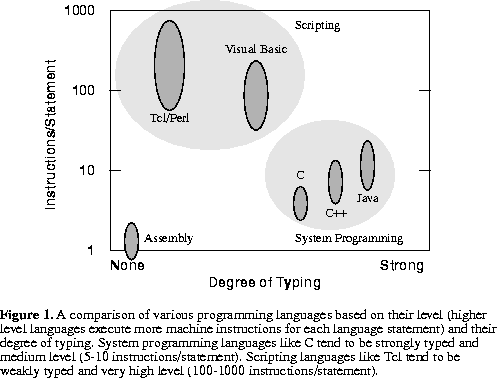
On average, each line of code in a system programming language translates to about five machine instructions, compared to one instruction per line in assembly language (in an informal analysis of eight C files written by five different people, I found that the ratio ranged from about 3 to 7 instructions per line[7]; in a study of numerous languages Capers Jones found that for a given task, assembly languages require about 3-6 times as many lines of code as system programming languages[3]). Programmers can write roughly the same number of lines of code per year regardless of language[1], so system programming languages allow applications to be written much more quickly than assembly language.
The same effect applies when going from a high-level compiled language to a scripting language, except that the multiplier effect is even greater. As Ousterhout says: "A typical statement in a scripting language executes hundreds or thousands of machine instructions." The net result is summarized in the following graph.


This graph produced a kind of "Aha!" moment for me, because I realized (in a way I somehow hadn't, before) that scripting languages were all about code reuse; that if I could reduce the number of lines of code I write, I can (almost by definition) reduce the number of bugs I write; and that if one can accomplish an operation by calling a library method (such as the String "replace" method in JavaScript), scripted code can run at compiled-language speed, because a scripting language's built-in methods are implemented in C++ (Spidermonkey) or Java (Rhino).

If you haven't read Ousterhout's paper before, I don't want to spoil the suspense here. Suffice it to say, the paper gives a balanced account of the strengths and weaknesses of languages of all kinds; there's no language-bigotry, no theological diatribes. It's a concise and eloquent treatment of a tricky topic, and considering the year in which it was written, it's quite a prescient piece in many ways. On top of everything else, it's just plain entertaining to read -- a rarity these days, online or off-.

Tuesday, March 17, 2009

Java as Legacy Language

Bruce Eckel (Thinking in Java) has an interesting post on The Positive Legacy of C++ and Java. I'm a sucker for articles that talk about Java and C++ as legacy languages, and this one is notable not only for the fact that it comes from a true authority (Eckel was on the C++ Standards Committee for 8 years, and saw the language design decisions take place first-hand) but for the 70-odd comments (mostly lengthy, mostly astute and non-emotional) that his post provoked.

Eckel's post is akin to a very short eulogy. I wish it had been much longer. But the fact is, Eckel has written numerous article, books, and blogs over the past five or six years outlining the weaknesses (large and small) of Java and C++, so it's not hard to find more to read on this subject.

Java is far from dead, of course. Much like COBOL, it will live on and on, eventually becoming something of an arcane specialty language mostly taught in universities.

What were (are) some of Java's biggest failings? Maybe it's more important (and constructive) to ask what its biggest successes were. To me, Java's major disruptive effect (when it arrived in the mid-1990s) was and is due to its game-changing notion of running on a virtualized machine. The idea of cleanly separating a language from underlying machine dependencies was a huge advance. In sum, the importance of Java is that it was/is not just a language but a platform.

A second pivotally important aspect of Java is that by its very design, it facilitated programming-in-the-large. The package mechanism, the orientation toward safe reuse, and the assurance of a common, stable, secure, platform-independent process space in which to run (the JVM), allowed teams of programmers to work independently to produce large applications that could take advantage of the huge advances in machine design (per Moore's Law) that occurred throughout the 1990s (without which, frankly, Java would have failed to be anything but a curiosity).

By supporting programming-in-the-large, Java made possible the huge middleware industry we see around us today. Certainly we would have had a middleware industry without Java, but it would have looked much different and come with a much different set of problems. (It would have had even more of a Rube Goldbergish quality to it than it has now.) Java popularized the notion of an application server, which by itself was a landmark development that changed the software industry.

Another outcome of Java (and C++): The notion of design patterns. The very complexity of the large systems made possible by Java and C++ demanded a new type of "best practices" knowledge around the construction of "orchestrated systems" (tm).

We owe a lot to Java, clearly, but the sheer cost of using Java for smaller-scale projects is driving the creation of new, lighter-weight languages and frameworks that offer a better impedance match with agile working styles. Going forward, it simply won't be economical to use Java for most kinds of development.

The industry hasn't quite figured out yet what the best technologies are for replacing Java in various types of development, but that's what makes things so interesting right now. Economic downturns like the one we're in tend to drive intense competition, and intense competition breeds innovation. Hence, whatever the next Big Disruption in programming turns out to be, it will probably come sooner rather than later.

One thing is for sure: If you're in the software development business, don't cling to old ways of doing development. And also, don't get too carried away thinking that something like Scrum is going to be the Bandaid that fixes your agility problems, because it may turn out that your main problem is Java itself. Keep an open mind. Try new things. Be ready when the next disruption arrives, or you may find yourself without a chair when the music stops.

Sunday, March 15, 2009

JWebPain

At the last JavaOne, Sun pre-announced a technology that Java developers have been wanting desperately for years: decent browser emulation in a Swing component. The demo (of something called JWebPane) got everyone pretty excited. It looked too good to be true. And now maybe it is.

Mind you, I don't have any kind of inside information to share (I wish I did) and I don't know any more than you do what happened to JWebPane. But it's been missing-in-action ever since the Big Demo. Even Sun's bloggers have gone silent on it. The last known-good Sun blog on JWebPane was Alexy Ushakov's blog of 10 December 2008. Ushakov is the tech lead on JWebPane. He hasn't blogged about it since. And neither has anyone else at Sun, from what I can determine.

I have to wonder, at this point, if JWebPane hasn't been back-burnered in favor of something more important (although I can't imagine what that might be, frankly). I'm starting to think JWebPane might actually be pre-announced a second time, at the next JavaOne.

Here's what we know so far. JWebPane is based on WebKit and (of necessity) uses JNI to glue-through to WebKit. It leverages Java2D for rendering and will support an Events API (among others). Contrary to myth, it doesn't require JavaFX. Some additional details can be seen at http://blogs.sun.com/thejavatutorials/entry/html_component, where (interestingly) the JWebPane project was described as 70% complete back in May 2008.

Some JWebPane sample code is given in this slideshow. Of course, there's no way to use the code since JWebPane isn't available for download, but at least you can see some of the basic usage patterns.

Sun has tried before to provide a degree of HTML rendering capability in various components:
Anyone who has tried to use these prior APIs for anything nontrivial knows what the limitations are. They're substantial.

Currently there are two popular substitutes for the not-yet-ready JWebPane. MozSwing is an integration of XULRunner with Swing and is quite an interesting beast in its own right. The Flying Saucer Project is quite a powerful XHTML-rendering technology, notable for its extensive support of CSS (and its lack of support for JavaScript).

MozSwing has been criticized for being heavyweight (something like 50MB), but I think we can safely assume that JWebPane, if it ever sees the light of day, won't exactly be the anorexic runway model of HTML components. It probably also won't be anyone's idea of elegant or performant (judging only from Sun's history on stuff like this), but we'll see.

If you Google around and visit some forums, you can see that developers (believing Sun's promise of nearly a year ago that JWebPane would be ready in 3 months) have held off on new projects, waiting for JWP's release. This is the tragedy that is Sun, though. Sun exuberantly pre-announces a technology that should have been introduced a decade ago, then fails to deliver on a timely basis, betraying the trust of the very developers it hopes to attract with things like JavaFX.

Let this be a case study for other vendors considering pre-announcing exciting new technologies. Be ready to deliver, or else don't pre-announce. If you pre-announce and don't come through, you've simultaneously destroyed your own credibility and antagonized potential customers. And if you're in the software business and the people you've antagonized are developers, you've done yourself a double disservice. (Generally speaking, the last people you want to antagonize, if you're looking to build mindshare, are developers.)

Let's sum it up this way: When in doubt, don't pre-announce. Instead, keep your mouth wide shut.

Saturday, March 14, 2009

JMenu's 433 methods

I've referred, in previous posts, to the fact that Java's JMenu class has 433 methods. I pick on the JMenu class sometimes when I need a convenient example of the piggishness of Java or inheritance gone to an extreme. An alphabetized list of all 433 of JMenu's methods is shown below.

Please note that JMenu is at the bottom of a 7-level-deep inheritance chain. Hence, it inherits most of its methods. All of the inherited methods are shown below along with JMenu's own declared methods, which come at the bottom.

I explain how this list was generated (using JavaScript, in Firefox) at the end of the list. Please scroll down.

java.awt.Component.action(java.awt.Event,java.lang.Object)
java.awt.Component.add(java.awt.PopupMenu)
java.awt.Component.addComponentListener(java.awt.event.ComponentListener)
java.awt.Component.addFocusListener(java.awt.event.FocusListener)
java.awt.Component.addHierarchyBoundsListener(java.awt.event.HierarchyBoundsListener)
java.awt.Component.addHierarchyListener(java.awt.event.HierarchyListener)
java.awt.Component.addInputMethodListener(java.awt.event.InputMethodListener)
java.awt.Component.addKeyListener(java.awt.event.KeyListener)
java.awt.Component.addMouseListener(java.awt.event.MouseListener)
java.awt.Component.addMouseMotionListener(java.awt.event.MouseMotionListener)
java.awt.Component.addMouseWheelListener(java.awt.event.MouseWheelListener)
java.awt.Component.bounds()
java.awt.Component.checkImage(java.awt.Image,int,int,java.awt.image.ImageObserver)
java.awt.Component.checkImage(java.awt.Image,java.awt.image.ImageObserver)
java.awt.Component.contains(java.awt.Point)
java.awt.Component.createImage(int,int)
java.awt.Component.createImage(java.awt.image.ImageProducer)
java.awt.Component.createVolatileImage(int,int)
java.awt.Component.createVolatileImage(int,int,java.awt.ImageCapabilities)
java.awt.Component.dispatchEvent(java.awt.AWTEvent)
java.awt.Component.enable(boolean)
java.awt.Component.enableInputMethods(boolean)
java.awt.Component.firePropertyChange(java.lang.String,byte,byte)
java.awt.Component.firePropertyChange(java.lang.String,double,double)
java.awt.Component.firePropertyChange(java.lang.String,float,float)
java.awt.Component.firePropertyChange(java.lang.String,long,long)
java.awt.Component.firePropertyChange(java.lang.String,short,short)
java.awt.Component.getBackground()
java.awt.Component.getBounds()
java.awt.Component.getColorModel()
java.awt.Component.getComponentListeners()
java.awt.Component.getComponentOrientation()
java.awt.Component.getCursor()
java.awt.Component.getDropTarget()
java.awt.Component.getFocusCycleRootAncestor()
java.awt.Component.getFocusListeners()
java.awt.Component.getFocusTraversalKeysEnabled()
java.awt.Component.getFont()
java.awt.Component.getForeground()
java.awt.Component.getGraphicsConfiguration()
java.awt.Component.getHierarchyBoundsListeners()
java.awt.Component.getHierarchyListeners()
java.awt.Component.getIgnoreRepaint()
java.awt.Component.getInputContext()
java.awt.Component.getInputMethodListeners()
java.awt.Component.getInputMethodRequests()
java.awt.Component.getKeyListeners()
java.awt.Component.getLocale()
java.awt.Component.getLocation()
java.awt.Component.getLocationOnScreen()
java.awt.Component.getMouseListeners()
java.awt.Component.getMouseMotionListeners()
java.awt.Component.getMousePosition()
java.awt.Component.getMouseWheelListeners()
java.awt.Component.getName()
java.awt.Component.getParent()
java.awt.Component.getPeer()
java.awt.Component.getPropertyChangeListeners()
java.awt.Component.getPropertyChangeListeners(java.lang.String)
java.awt.Component.getSize()
java.awt.Component.getToolkit()
java.awt.Component.getTreeLock()
java.awt.Component.gotFocus(java.awt.Event,java.lang.Object)
java.awt.Component.handleEvent(java.awt.Event)
java.awt.Component.hasFocus()
java.awt.Component.hide()
java.awt.Component.inside(int,int)
java.awt.Component.isBackgroundSet()
java.awt.Component.isCursorSet()
java.awt.Component.isDisplayable()
java.awt.Component.isEnabled()
java.awt.Component.isFocusOwner()
java.awt.Component.isFocusTraversable()
java.awt.Component.isFocusable()
java.awt.Component.isFontSet()
java.awt.Component.isForegroundSet()
java.awt.Component.isLightweight()
java.awt.Component.isMaximumSizeSet()
java.awt.Component.isMinimumSizeSet()
java.awt.Component.isPreferredSizeSet()
java.awt.Component.isShowing()
java.awt.Component.isValid()
java.awt.Component.isVisible()
java.awt.Component.keyDown(java.awt.Event,int)
java.awt.Component.keyUp(java.awt.Event,int)
java.awt.Component.list()
java.awt.Component.list(java.io.PrintStream)
java.awt.Component.list(java.io.PrintWriter)
java.awt.Component.location()
java.awt.Component.lostFocus(java.awt.Event,java.lang.Object)
java.awt.Component.mouseDown(java.awt.Event,int,int)
java.awt.Component.mouseDrag(java.awt.Event,int,int)
java.awt.Component.mouseEnter(java.awt.Event,int,int)
java.awt.Component.mouseExit(java.awt.Event,int,int)
java.awt.Component.mouseMove(java.awt.Event,int,int)
java.awt.Component.mouseUp(java.awt.Event,int,int)
java.awt.Component.move(int,int)
java.awt.Component.nextFocus()
java.awt.Component.paintAll(java.awt.Graphics)
java.awt.Component.postEvent(java.awt.Event)
java.awt.Component.prepareImage(java.awt.Image,int,int,java.awt.image.ImageObserver)
java.awt.Component.prepareImage(java.awt.Image,java.awt.image.ImageObserver)
java.awt.Component.remove(java.awt.MenuComponent)
java.awt.Component.removeComponentListener(java.awt.event.ComponentListener)
java.awt.Component.removeFocusListener(java.awt.event.FocusListener)
java.awt.Component.removeHierarchyBoundsListener(java.awt.event.HierarchyBoundsListener)
java.awt.Component.removeHierarchyListener(java.awt.event.HierarchyListener)
java.awt.Component.removeInputMethodListener(java.awt.event.InputMethodListener)
java.awt.Component.removeKeyListener(java.awt.event.KeyListener)
java.awt.Component.removeMouseListener(java.awt.event.MouseListener)
java.awt.Component.removeMouseMotionListener(java.awt.event.MouseMotionListener)
java.awt.Component.removeMouseWheelListener(java.awt.event.MouseWheelListener)
java.awt.Component.removePropertyChangeListener(java.beans.PropertyChangeListener)
java.awt.Component.removePropertyChangeListener(java.lang.String,java.beans.PropertyChangeListener)
java.awt.Component.repaint()
java.awt.Component.repaint(int,int,int,int)
java.awt.Component.repaint(long)
java.awt.Component.resize(int,int)
java.awt.Component.resize(java.awt.Dimension)
java.awt.Component.setBounds(int,int,int,int)
java.awt.Component.setBounds(java.awt.Rectangle)
java.awt.Component.setCursor(java.awt.Cursor)
java.awt.Component.setDropTarget(java.awt.dnd.DropTarget)
java.awt.Component.setFocusTraversalKeysEnabled(boolean)
java.awt.Component.setFocusable(boolean)
java.awt.Component.setIgnoreRepaint(boolean)
java.awt.Component.setLocale(java.util.Locale)
java.awt.Component.setLocation(int,int)
java.awt.Component.setLocation(java.awt.Point)
java.awt.Component.setName(java.lang.String)
java.awt.Component.setSize(int,int)
java.awt.Component.setSize(java.awt.Dimension)
java.awt.Component.show()
java.awt.Component.show(boolean)
java.awt.Component.size()
java.awt.Component.toString()
java.awt.Component.transferFocus()
java.awt.Component.transferFocusUpCycle()
java.awt.Container.add(java.awt.Component,java.lang.Object)
java.awt.Container.add(java.awt.Component,java.lang.Object,int)
java.awt.Container.add(java.lang.String,java.awt.Component)
java.awt.Container.addContainerListener(java.awt.event.ContainerListener)
java.awt.Container.addPropertyChangeListener(java.beans.PropertyChangeListener)
java.awt.Container.addPropertyChangeListener(java.lang.String,java.beans.PropertyChangeListener)
java.awt.Container.areFocusTraversalKeysSet(int)
java.awt.Container.countComponents()
java.awt.Container.deliverEvent(java.awt.Event)
java.awt.Container.doLayout()
java.awt.Container.findComponentAt(int,int)
java.awt.Container.findComponentAt(java.awt.Point)
java.awt.Container.getComponent(int)
java.awt.Container.getComponentAt(int,int)
java.awt.Container.getComponentAt(java.awt.Point)
java.awt.Container.getComponentCount()
java.awt.Container.getComponentZOrder(java.awt.Component)
java.awt.Container.getComponents()
java.awt.Container.getContainerListeners()
java.awt.Container.getFocusTraversalKeys(int)
java.awt.Container.getFocusTraversalPolicy()
java.awt.Container.getLayout()
java.awt.Container.getMousePosition(boolean)
java.awt.Container.insets()
java.awt.Container.invalidate()
java.awt.Container.isAncestorOf(java.awt.Component)
java.awt.Container.isFocusCycleRoot()
java.awt.Container.isFocusCycleRoot(java.awt.Container)
java.awt.Container.isFocusTraversalPolicyProvider()
java.awt.Container.isFocusTraversalPolicySet()
java.awt.Container.layout()
java.awt.Container.list(java.io.PrintStream,int)
java.awt.Container.list(java.io.PrintWriter,int)
java.awt.Container.locate(int,int)
java.awt.Container.minimumSize()
java.awt.Container.paintComponents(java.awt.Graphics)
java.awt.Container.preferredSize()
java.awt.Container.printComponents(java.awt.Graphics)
java.awt.Container.removeContainerListener(java.awt.event.ContainerListener)
java.awt.Container.setComponentZOrder(java.awt.Component,int)
java.awt.Container.setFocusCycleRoot(boolean)
java.awt.Container.setFocusTraversalPolicy(java.awt.FocusTraversalPolicy)
java.awt.Container.setFocusTraversalPolicyProvider(boolean)
java.awt.Container.transferFocusBackward()
java.awt.Container.transferFocusDownCycle()
java.awt.Container.validate()
java.lang.Object.equals(java.lang.Object)
java.lang.Object.getClass()
java.lang.Object.hashCode()
java.lang.Object.notify()
java.lang.Object.notifyAll()
java.lang.Object.wait()
java.lang.Object.wait(long)
java.lang.Object.wait(long,int)
javax.swing.AbstractButton.addActionListener(java.awt.event.ActionListener)
javax.swing.AbstractButton.addChangeListener(javax.swing.event.ChangeListener)
javax.swing.AbstractButton.addItemListener(java.awt.event.ItemListener)
javax.swing.AbstractButton.doClick()
javax.swing.AbstractButton.getAction()
javax.swing.AbstractButton.getActionCommand()
javax.swing.AbstractButton.getActionListeners()
javax.swing.AbstractButton.getChangeListeners()
javax.swing.AbstractButton.getDisabledIcon()
javax.swing.AbstractButton.getDisabledSelectedIcon()
javax.swing.AbstractButton.getDisplayedMnemonicIndex()
javax.swing.AbstractButton.getHideActionText()
javax.swing.AbstractButton.getHorizontalAlignment()
javax.swing.AbstractButton.getHorizontalTextPosition()
javax.swing.AbstractButton.getIcon()
javax.swing.AbstractButton.getIconTextGap()
javax.swing.AbstractButton.getItemListeners()
javax.swing.AbstractButton.getLabel()
javax.swing.AbstractButton.getMargin()
javax.swing.AbstractButton.getMnemonic()
javax.swing.AbstractButton.getModel()
javax.swing.AbstractButton.getMultiClickThreshhold()
javax.swing.AbstractButton.getPressedIcon()
javax.swing.AbstractButton.getRolloverIcon()
javax.swing.AbstractButton.getRolloverSelectedIcon()
javax.swing.AbstractButton.getSelectedIcon()
javax.swing.AbstractButton.getSelectedObjects()
javax.swing.AbstractButton.getText()
javax.swing.AbstractButton.getUI()
javax.swing.AbstractButton.getVerticalAlignment()
javax.swing.AbstractButton.getVerticalTextPosition()
javax.swing.AbstractButton.imageUpdate(java.awt.Image,int,int,int,int,int)
javax.swing.AbstractButton.isBorderPainted()
javax.swing.AbstractButton.isContentAreaFilled()
javax.swing.AbstractButton.isFocusPainted()
javax.swing.AbstractButton.isRolloverEnabled()
javax.swing.AbstractButton.removeActionListener(java.awt.event.ActionListener)
javax.swing.AbstractButton.removeChangeListener(javax.swing.event.ChangeListener)
javax.swing.AbstractButton.removeItemListener(java.awt.event.ItemListener)
javax.swing.AbstractButton.removeNotify()
javax.swing.AbstractButton.setAction(javax.swing.Action)
javax.swing.AbstractButton.setActionCommand(java.lang.String)
javax.swing.AbstractButton.setBorderPainted(boolean)
javax.swing.AbstractButton.setContentAreaFilled(boolean)
javax.swing.AbstractButton.setDisabledIcon(javax.swing.Icon)
javax.swing.AbstractButton.setDisabledSelectedIcon(javax.swing.Icon)
javax.swing.AbstractButton.setDisplayedMnemonicIndex(int)
javax.swing.AbstractButton.setFocusPainted(boolean)
javax.swing.AbstractButton.setHideActionText(boolean)
javax.swing.AbstractButton.setHorizontalAlignment(int)
javax.swing.AbstractButton.setHorizontalTextPosition(int)
javax.swing.AbstractButton.setIcon(javax.swing.Icon)
javax.swing.AbstractButton.setIconTextGap(int)
javax.swing.AbstractButton.setLabel(java.lang.String)
javax.swing.AbstractButton.setLayout(java.awt.LayoutManager)
javax.swing.AbstractButton.setMargin(java.awt.Insets)
javax.swing.AbstractButton.setMnemonic(char)
javax.swing.AbstractButton.setMnemonic(int)
javax.swing.AbstractButton.setMultiClickThreshhold(long)
javax.swing.AbstractButton.setPressedIcon(javax.swing.Icon)
javax.swing.AbstractButton.setRolloverEnabled(boolean)
javax.swing.AbstractButton.setRolloverIcon(javax.swing.Icon)
javax.swing.AbstractButton.setRolloverSelectedIcon(javax.swing.Icon)
javax.swing.AbstractButton.setSelectedIcon(javax.swing.Icon)
javax.swing.AbstractButton.setText(java.lang.String)
javax.swing.AbstractButton.setUI(javax.swing.plaf.ButtonUI)
javax.swing.AbstractButton.setVerticalAlignment(int)
javax.swing.AbstractButton.setVerticalTextPosition(int)
javax.swing.JComponent.addAncestorListener(javax.swing.event.AncestorListener)
javax.swing.JComponent.addNotify()
javax.swing.JComponent.addVetoableChangeListener(java.beans.VetoableChangeListener)
javax.swing.JComponent.computeVisibleRect(java.awt.Rectangle)
javax.swing.JComponent.contains(int,int)
javax.swing.JComponent.createToolTip()
javax.swing.JComponent.disable()
javax.swing.JComponent.enable()
javax.swing.JComponent.firePropertyChange(java.lang.String,boolean,boolean)
javax.swing.JComponent.firePropertyChange(java.lang.String,char,char)
javax.swing.JComponent.firePropertyChange(java.lang.String,int,int)
javax.swing.JComponent.getActionForKeyStroke(javax.swing.KeyStroke)
javax.swing.JComponent.getActionMap()
javax.swing.JComponent.getAlignmentX()
javax.swing.JComponent.getAlignmentY()
javax.swing.JComponent.getAncestorListeners()
javax.swing.JComponent.getAutoscrolls()
javax.swing.JComponent.getBaseline(int,int)
javax.swing.JComponent.getBaselineResizeBehavior()
javax.swing.JComponent.getBorder()
javax.swing.JComponent.getBounds(java.awt.Rectangle)
javax.swing.JComponent.getClientProperty(java.lang.Object)
javax.swing.JComponent.getComponentPopupMenu()
javax.swing.JComponent.getConditionForKeyStroke(javax.swing.KeyStroke)
javax.swing.JComponent.getDebugGraphicsOptions()
javax.swing.JComponent.getDefaultLocale()
javax.swing.JComponent.getFontMetrics(java.awt.Font)
javax.swing.JComponent.getGraphics()
javax.swing.JComponent.getHeight()
javax.swing.JComponent.getInheritsPopupMenu()
javax.swing.JComponent.getInputMap()
javax.swing.JComponent.getInputMap(int)
javax.swing.JComponent.getInputVerifier()
javax.swing.JComponent.getInsets()
javax.swing.JComponent.getInsets(java.awt.Insets)
javax.swing.JComponent.getListeners(java.lang.Class)
javax.swing.JComponent.getLocation(java.awt.Point)
javax.swing.JComponent.getMaximumSize()
javax.swing.JComponent.getMinimumSize()
javax.swing.JComponent.getNextFocusableComponent()
javax.swing.JComponent.getPopupLocation(java.awt.event.MouseEvent)
javax.swing.JComponent.getPreferredSize()
javax.swing.JComponent.getRegisteredKeyStrokes()
javax.swing.JComponent.getRootPane()
javax.swing.JComponent.getSize(java.awt.Dimension)
javax.swing.JComponent.getToolTipLocation(java.awt.event.MouseEvent)
javax.swing.JComponent.getToolTipText()
javax.swing.JComponent.getToolTipText(java.awt.event.MouseEvent)
javax.swing.JComponent.getTopLevelAncestor()
javax.swing.JComponent.getTransferHandler()
javax.swing.JComponent.getVerifyInputWhenFocusTarget()
javax.swing.JComponent.getVetoableChangeListeners()
javax.swing.JComponent.getVisibleRect()
javax.swing.JComponent.getWidth()
javax.swing.JComponent.getX()
javax.swing.JComponent.getY()
javax.swing.JComponent.grabFocus()
javax.swing.JComponent.isDoubleBuffered()
javax.swing.JComponent.isLightweightComponent(java.awt.Component)
javax.swing.JComponent.isManagingFocus()
javax.swing.JComponent.isOpaque()
javax.swing.JComponent.isOptimizedDrawingEnabled()
javax.swing.JComponent.isPaintingForPrint()
javax.swing.JComponent.isPaintingTile()
javax.swing.JComponent.isRequestFocusEnabled()
javax.swing.JComponent.isValidateRoot()
javax.swing.JComponent.paint(java.awt.Graphics)
javax.swing.JComponent.paintImmediately(int,int,int,int)
javax.swing.JComponent.paintImmediately(java.awt.Rectangle)
javax.swing.JComponent.print(java.awt.Graphics)
javax.swing.JComponent.printAll(java.awt.Graphics)
javax.swing.JComponent.putClientProperty(java.lang.Object,java.lang.Object)
javax.swing.JComponent.registerKeyboardAction(java.awt.event.ActionListener,java.lang.String,javax.swing.KeyStroke,int)
javax.swing.JComponent.registerKeyboardAction(java.awt.event.ActionListener,javax.swing.KeyStroke,int)
javax.swing.JComponent.removeAncestorListener(javax.swing.event.AncestorListener)
javax.swing.JComponent.removeVetoableChangeListener(java.beans.VetoableChangeListener)
javax.swing.JComponent.repaint(java.awt.Rectangle)
javax.swing.JComponent.repaint(long,int,int,int,int)
javax.swing.JComponent.requestDefaultFocus()
javax.swing.JComponent.requestFocus()
javax.swing.JComponent.requestFocus(boolean)
javax.swing.JComponent.requestFocusInWindow()
javax.swing.JComponent.resetKeyboardActions()
javax.swing.JComponent.reshape(int,int,int,int)
javax.swing.JComponent.revalidate()
javax.swing.JComponent.scrollRectToVisible(java.awt.Rectangle)
javax.swing.JComponent.setActionMap(javax.swing.ActionMap)
javax.swing.JComponent.setAlignmentX(float)
javax.swing.JComponent.setAlignmentY(float)
javax.swing.JComponent.setAutoscrolls(boolean)
javax.swing.JComponent.setBackground(java.awt.Color)
javax.swing.JComponent.setBorder(javax.swing.border.Border)
javax.swing.JComponent.setComponentPopupMenu(javax.swing.JPopupMenu)
javax.swing.JComponent.setDebugGraphicsOptions(int)
javax.swing.JComponent.setDefaultLocale(java.util.Locale)
javax.swing.JComponent.setDoubleBuffered(boolean)
javax.swing.JComponent.setFocusTraversalKeys(int,java.util.Set)
javax.swing.JComponent.setFont(java.awt.Font)
javax.swing.JComponent.setForeground(java.awt.Color)
javax.swing.JComponent.setInheritsPopupMenu(boolean)
javax.swing.JComponent.setInputMap(int,javax.swing.InputMap)
javax.swing.JComponent.setInputVerifier(javax.swing.InputVerifier)
javax.swing.JComponent.setMaximumSize(java.awt.Dimension)
javax.swing.JComponent.setMinimumSize(java.awt.Dimension)
javax.swing.JComponent.setNextFocusableComponent(java.awt.Component)
javax.swing.JComponent.setOpaque(boolean)
javax.swing.JComponent.setPreferredSize(java.awt.Dimension)
javax.swing.JComponent.setRequestFocusEnabled(boolean)
javax.swing.JComponent.setToolTipText(java.lang.String)
javax.swing.JComponent.setTransferHandler(javax.swing.TransferHandler)
javax.swing.JComponent.setVerifyInputWhenFocusTarget(boolean)
javax.swing.JComponent.setVisible(boolean)
javax.swing.JComponent.unregisterKeyboardAction(javax.swing.KeyStroke)
javax.swing.JComponent.update(java.awt.Graphics)
javax.swing.JMenu.add(java.awt.Component)
javax.swing.JMenu.add(java.awt.Component,int)
javax.swing.JMenu.add(java.lang.String)
javax.swing.JMenu.add(javax.swing.Action)
javax.swing.JMenu.add(javax.swing.JMenuItem)
javax.swing.JMenu.addMenuListener(javax.swing.event.MenuListener)
javax.swing.JMenu.addSeparator()
javax.swing.JMenu.applyComponentOrientation(java.awt.ComponentOrientation)
javax.swing.JMenu.doClick(int)
javax.swing.JMenu.getAccessibleContext()
javax.swing.JMenu.getComponent()
javax.swing.JMenu.getDelay()
javax.swing.JMenu.getItem(int)
javax.swing.JMenu.getItemCount()
javax.swing.JMenu.getMenuComponent(int)
javax.swing.JMenu.getMenuComponentCount()
javax.swing.JMenu.getMenuComponents()
javax.swing.JMenu.getMenuListeners()
javax.swing.JMenu.getPopupMenu()
javax.swing.JMenu.getSubElements()
javax.swing.JMenu.getUIClassID()
javax.swing.JMenu.insert(java.lang.String,int)
javax.swing.JMenu.insert(javax.swing.Action,int)
javax.swing.JMenu.insert(javax.swing.JMenuItem,int)
javax.swing.JMenu.insertSeparator(int)
javax.swing.JMenu.isMenuComponent(java.awt.Component)
javax.swing.JMenu.isPopupMenuVisible()
javax.swing.JMenu.isSelected()
javax.swing.JMenu.isTearOff()
javax.swing.JMenu.isTopLevelMenu()
javax.swing.JMenu.menuSelectionChanged(boolean)
javax.swing.JMenu.remove(int)
javax.swing.JMenu.remove(java.awt.Component)
javax.swing.JMenu.remove(javax.swing.JMenuItem)
javax.swing.JMenu.removeAll()
javax.swing.JMenu.removeMenuListener(javax.swing.event.MenuListener)
javax.swing.JMenu.setAccelerator(javax.swing.KeyStroke)
javax.swing.JMenu.setComponentOrientation(java.awt.ComponentOrientation)
javax.swing.JMenu.setDelay(int)
javax.swing.JMenu.setMenuLocation(int,int)
javax.swing.JMenu.setModel(javax.swing.ButtonModel)
javax.swing.JMenu.setPopupMenuVisible(boolean)
javax.swing.JMenu.setSelected(boolean)
javax.swing.JMenu.updateUI()
javax.swing.JMenuItem.addMenuDragMouseListener(javax.swing.event.MenuDragMouseListener)
javax.swing.JMenuItem.addMenuKeyListener(javax.swing.event.MenuKeyListener)
javax.swing.JMenuItem.getAccelerator()
javax.swing.JMenuItem.getMenuDragMouseListeners()
javax.swing.JMenuItem.getMenuKeyListeners()
javax.swing.JMenuItem.isArmed()
javax.swing.JMenuItem.processKeyEvent(java.awt.event.KeyEvent,javax.swing.MenuElement[],javax.swing.MenuSelectionManager)
javax.swing.JMenuItem.processMenuDragMouseEvent(javax.swing.event.MenuDragMouseEvent)
javax.swing.JMenuItem.processMenuKeyEvent(javax.swing.event.MenuKeyEvent)
javax.swing.JMenuItem.processMouseEvent(java.awt.event.MouseEvent,javax.swing.MenuElement[],javax.swing.MenuSelectionManager)
javax.swing.JMenuItem.removeMenuDragMouseListener(javax.swing.event.MenuDragMouseListener)
javax.swing.JMenuItem.removeMenuKeyListener(javax.swing.event.MenuKeyListener)
javax.swing.JMenuItem.setArmed(boolean)
javax.swing.JMenuItem.setEnabled(boolean)
javax.swing.JMenuItem.setUI(javax.swing.plaf.MenuItemUI)


How This List Was Generated
I ran the following lines of JavaScript in my Firebug console:


jmenu = new Packages.javax.swing.JMenu( );

methods = jmenu.getClass( ).getMethods( );

r = /j[^( ]+\([^)]*\)/; // match just the method

for (var i = 0,
jsArray=[],
name = ""; i < methods.length; i++ ) {

name = methods[ i ].toString( );
jsArray.push( name.match( r )[ 0 ] );
}

markup = jsArray.sort( ).join( "<br/>" );
document.body.innerHTML = markup;


The key thing to understand is that you can call Java from JavaScript, in Firefox, using the Packages syntax (as shown above). Security restrictions will keep you from doing anything too interesting with scripted Java, but it's noteworthy that you can at least instantiate Java objects, including Swing objects, this way.

BTW, if you find a Java class that has more than 433 methods (clue: I do know of one more Swing class that has > 433 methods), let me know what it is. I'll credit you here.

Thursday, March 12, 2009

JavaScript needs Elvis

I submitted an enhancement request to the Mozilla folks yesterday. My request? Add an Elvis operator to JavaScript.

If you program in Groovy, you already know what I'm talking about, and it has nothing to do with impersonators or Las Vegas.

If you're not familiar with the Elvis operator, here's the text of my enhancement request to Mozilla:
An Elvis operator similar to Groovy's (which is also being considered for
Scala, and is in the vein of C#'s null-coalescence operator) would add
significant value to JavaScript by letting coders write safer scripts with very
little added effort.

Please see
http://groovy.codehaus.org/Operators#Operators-ElvisOperator%28%3F%3A%29 for a
description.

Basically, Elvis is a collapsed version of the Java/C ternary operator:

return user ?: "Anonymous"; // if user is null, use "Anonymous"

(Allows a function that's supposed to return a String to always return a String
and never return undefined or null.)

function cat(b,c) { return (b?:"") + (c?:"") ; }


Calling cat() with zero or one args still produces a safe return value; caller
needn't check for null or undefined; function needn't contain arg-sanity
checks.

In short, the availability of an Elvis operator makes sanity-injection easy and
will improve the robustness of scripts in the wild as people start to use it.
Alas, Brendan Eich summarily dismissed my suggestion, saying that "idiomatic JS already uses || for the same purposes, but admitting other 'falsy' values than null and undefined."

Eich offered the following illustration:

function cat(b,c) { return (b || "") + (c || ""); }


To which I say: Yes, of course, that sort of kludgy thing works and people use it all the time. But is it right?

While I can appreciate Eich not wanting to "junk up" JavaScript with new operators, I think using the logical-OR operator in the foregoing hacky way does nothing to make code more readable or preserve ||'s original semantics, IMHO. That's the whole point of having a separate operator. The semantics are unambiguous (to a human being, which is what counts; never mind the interpreter).

I'm not alone in this opinion. See Scala Elvis discussion. See also the discussion of null convenience operators for the Fan OO language. See also Stephen Colebourne's excellent discussion of a proposed Elvis syntax for null handling in Java. See also the C# null-coaslescence operator.

I respect Brendan Eich more than apple pie itself, but I think it's significant that others have already considered his argument and found it wanting.

There's still much to recommend Elvis. Java could certainly benefit from it. How many lines of sanity-checking code have people written at the start of a method to to see if arguments are null? More important: How many lines of such code have not been written (through sheer oversight), resulting in mayhem later? (Let he who is without sin throw the first NullPointerException.)

While we're at it, I think Java could use a safe property accessor (a la Groovy):

theName = user?.name; // gives null, not NPE, if name is null


Colebourne has published data (acquired at Devoxx) showing that better null handling is the No. 1 most requested feature by Java programmers. The actual whiteboard photo from the data-gathering session is here (warning: large image).

When programmers beg for a simple syntax feature that makes the language safer and easier to read (while eliminating tedious sanity-checking boilerplate), why not put the feature into the language? What justification could there be for not doing so? Who benefits by keeping a feature out of the language that would cut down on null pointer exceptions?

Does JavaScript (and Java) need Elvis? I'm convinced it does. What do you think?

Thank you . . . Thank you very much.

Wednesday, March 11, 2009

Programmer Personas

I came across an interesting (and short) paper by Microsoft user experience guru Steven Clarke called "What Is an End User Software Engineer?" It discusses the idea of programmer personas and how Microsoft has leveraged that concept to (re)design Visual Studio and various APIs for better usability.

A persona captures assumptions around work styles and motivations. Not all programmers are motivated by the same things or have the same goals. A sales engineer might have a different set of problems to solve than a senior developer in R&D, and might be accustomed to working in quite a different way. Yet both may have to code against the same libraries using the same tools. Is it possible to satisfy both groups of programmer-users? Are there API-design or tool-design best practices that apply across the board regardless of persona type? What do we know about the things that work for one programmer persona but not another?

The formulation of persona types is obviously somewhat arbitrary, but it's interesting that Microsoft did go to the trouble to observe programmers working not only in usability labs but in their "natural habitats" over a period of 12 months in order to arrive at three main personas:
  • THE SYSTEMATIC DEVELOPER: Writes code defensively. Does everything he or she can to protect code from unstable and untrustworthy processes running in parallel with their code. Develops a deep understanding of a technology before using it. Prides himself or herself on building elegant solutions.
  • THE PRAGMATIC DEVELOPER: Writes code methodically. Develops sufficient understanding of a technology to enable competent use of it. Prides himself or herself on building robust applications.
  • THE OPPORTUNISTIC DEVELOPER: Writes code in an exploratory fashion. Develops a sufficient understanding of a technology to understand how it can solve a business problem. Prides himself/herself on solving business problems.
Clarke discusses Microsoft's usability philosophy in greater detail in a 2005 Dr Dobbs Journal article that I think is still quite relevant today. Check it out when you get a chance.

For people in the tooling and API-design business, there's a lot to think about here. Ask yourself: Do you know what the personas of your users might be like? Are you taking that information into account in your API, SDK, and tool designs? Do you do serious usability testing of your APIs and development tools before putting them in the hands of customers? If not, why not?

Giving programmers usable tools, it seems to me, is the first step to making programmers more productive. And that benefits everyone.

Tuesday, March 10, 2009

Why do we still have vendor lock-in?

There's a common myth that one of the main reasons enterprise customers get locked in to a particular vendor's technology is the huge investment (of time and money) that goes into specifying, procuring, rolling out, and maintaining a large system.

I was talking to a financial analyst the other day about this very phenomenon. The name of a well-known CMS vendor came up. My financial-analyst friend -- somewhat new to the software biz -- asked whether the huge cost of rolling out, training for, and maintaining a large system didn't pose an enormous disincentive for customers considering moving to another system. I said no, that's a myth.

"That's the amazing thing about this business," I said. "People walk away from million-dollar systems all the time."

It's not hard to understand. If an expensive system is draining you dry, you have to stop the bleeding. Sometimes the best way to do that is to stop throwing money at a bad solution and move on.

"But how do you walk away from an investment of X-million dollars?" my financial-analyst friend wanted to know.

First of all, understand that capital expenditures are depreciated over time. From an accounting point of view, investments in software are "walked away from" routinely; it's a given. The real question isn't whether you can afford to write off a bad investment, but what it will cost (in current dollars) to move to a new system.

The impediments to moving to a new system can be many, but typically, lock-in occurs because data is "interred" in proprietary formats (making migration to a new system costly), or because large amounts of custom-written application code will need to be ported (at great cost) to the new system. Or both.

Data lock-in happens in funny ways. You can have all your content in standard industry formats (XML, JPG, PDF) and still be locked into a content management system very tightly by virtue of the system's metadata mappings or database schemas, or by virtue of the system's use of a template structure or dynamic page language that's proprietary.

The existence of large amounts of custom-written application code is also a serious problem. It may not even be possible (even in theory) to port code from the old system to a new one, if the APIs and abstraction levels are far enough apart. You may well end up having to rewrite some or all of your custom apps from scratch. And that can get very expensive very quickly.

In sum: The high cost of data and code migration remain serious impediments to moving off of existing systems. Which presents an opportunity, of sorts, for vendors.

If you're a vendor and you want to convince someone to buy a new system, make it attractive for them to move off their old system. At a bare minimum:

1. Provide good data migration utilities. Take the pain out of migration.

2. Since customers will be rewriting and/or walking away from large amounts of legacy code, provide rapid application development tools -- including powerful code libraries and easy-to-learn APIs -- that enable new customers to put custom apps together quickly. (This is a hugely important topic that deserves much more attention than I can give it here.)

3. Give customers a licensing option that doesn't lead to high first-year costs. Offer a pay-as-you-go option. Customers don't like to write large checks in Year One.

4. Make your software less hardware-intensive than the incumbent's, so that your customer can get by on fewer CPUs, less RAM, less disk storage, etc. If you can save your customer a few hardware-budget dollars, he or she may be more likely to reallocate some of those dollars to software.

5. Make the administration experience easy. If you can prove that your system entails less administrative burden (and you can document the cost savings in terms of headcount reduction), it can help make the case for moving to a new system.

One thing is certain: Now is not the time to be selling big, old-fashioned middleware systems the old-fashioned way. People aren't willing (or able, in this economy) to spend a million dollars to be vendor-locked to a "solution" that's hard to migrate data and applications into or out of. As I said last October, the days of the million-dollar whITe elephant are drawing to a close. After this recession is over, there will be fewer species than before. I think we all know that.

Monday, March 09, 2009

Cuil not so cool any more

There's a graph of declining Cuil traffic numbers at Alexa.com that you'd think would have Cuil's investors jumping off the top of the nearest tall building. (Be sure to check out all 3 tabs: Reach, Rank, and Page Views. They're all terrifying.)
The Internet-surfing public has voted with their feet on this one, I'd say. What's odd is that the downtrend has been in progress for quite some time, yet Cuil's designers have done nothing to try to stem the exodus. Have they not heard of A/B testing? Does anyone at Cuil know anything about analytics? Maybe they've been trying like heck to stop the bleeding and we just don't know it.
Whatever. The kid in The Sixth Sense can now say "I see abandoned search engines..."

Google uses more electricity than most countries on earth

Google is notoriously secretive about its data centers (their locations, their layouts, how much electricity they use, or even how many of them there are), saying only that the company has a stated goal and of being carbon-neutral. It's believed that Google has at least three dozen dedicated data centers (although studies of IP addresses suggests there may be many more than that). Most, if not all, of the Google data centers draw power from hydroelectric or nuclear plants.

Google says that a typical search query uses an amount of energy equivalent to the release of 0.2 grams of CO2. If that's true, and if Google handles a billion queries a day, that's equivalent to a net release of 200 tons of CO2 per day. But remember, Google's data centers are not powered by coal-driven generators (they use hydro or nuclear power instead), so in essence a Google search costs nothing, in terms of carbon dioxide.

In terms of electricity, it's a different story. We're talking huge amounts of electrical power. Some estimates put Google data center power usage at 50 megawatts per data center. At the end of a year, that's 432 million kilowatt-hours of energy used, per data center. For 36 data centers, we're talking a grand total of around 15 billion kWh per year. That's roughly twice the amount of electricity consumed by all U.S. government data centers put together [ref].

Just to put it in perspective, this means Google consumes more electricity than most countries on earth. If Google were a nation, it would rank somewhere around No. 75 of 215 countries. (For electricity usage by country, see the excellent chart here, based on statistics from the CIA Factbook.)

Friday, March 06, 2009

Java performance resources

Seeing as how I've written a post or two before on the subject of performance optimization, I should perhaps point out that Sun Microsystems now has a resource page devoted to Java performance (tuning info, troubleshooting advice, white papers, best practices articles, etc.) at http://java.sun.com/docs/performance/.

Also, the canonical advice on tuning Java for performance is still the 2005 white paper found at http://java.sun.com/performance/reference/whitepapers/tuning.html. Sun says this white paper is "a living document." But it hasn't changed since 2005, so you be the judge as to whether it can still fog a mirror.

Thursday, March 05, 2009

isNaN( Dunbar ) == true

There seems to be a lot of blogging these days about how many Twitter followers (and/or folllowees) is "too many." Inevitably someone will mention Dunbar's number.

Wikipedia, paraphrasing Gladwell, says that the Dunbar number "is a theoretical cognitive limit to the number of people with whom one can maintain stable social relationships. These are relationships in which an individual knows who each person is, and how each person relates to every other person."

"No precise value has been proposed for Dunbar's number," the person who wrote this Wikipedia entry points out, "but a commonly cited approximation is 150."

Approximation? Precise value?

The value 150 comes from a combination of observations in primatology (specifically, observations of grooming behavior in apes) and comparative anthropology (of a retrospective sort; i.e., looking at human organizational patterns of the far distant past).

Bottom line: This is a social metric based on ape habits and the tribal activities of ancient peoples. It's hard to imagine a less appropriate starting point for talking about the new modalities of social interaction made possible by technology that is still emerging. Do the grooming habits of non-human primates really apply to Twitter users? That's a pretty big disconnect for me.

I make no assumptions about how many social contacts a modern human can have. Over the past 150 years, a lot of effort has gone into the invention of new technologies that extend the social reach of individuals. The automobile. The telegraph. The telephone. The Internet.

Dunbar hypothesized that language itself may have been invented as a cheap way to maintain large numbers of social relationships (a cheap substitute for one-to-one physical contact).

Is there a limit on how many friends a person can have? What does it mean, in the online world, to maintain a friendship? Some friendships (in the offline world) are low-maintenance, while others are high-maintenance. I have friends from school and/or prior lives that (in a few cases) I've reconnected with after decades of no contact, and guess what? We're still friends.

Think of how many times you've found yourself in an airport waiting for a connecting flight, and you strike up a conversation with a total stranger, and go home with that person's contact info after "hitting it off." Does that not count as a friend relationship?

We're in new territory with the Social Web. Technology is connecting people in new ways. Debates about "how many online friends are too many" (especially when they invoke concepts from primatology) seem pedantic and parochial. "Dunbar's number" is not some fundamental constant of nature; it's not Planck's constant. It's a theoretical construct from sociology. Let's not give it more stature than it deserves.

In fact, I say let's call it what it is -- NaN (not a number) -- and move on.

Wednesday, March 04, 2009

Code reuse is overrated

Good coders code, great ones reuse. How can anyone disagree with that?

I don't disagree. The principle of not reinventing something after you've invented it is so old and so obvious (and so obviously useful) that no one would seriously dispute it.

What's very much worth disputing, though, is the value of "code-reuse percentage" as a metric, and the degree to which code reusability actually brings about any economies in the software business. I would argue that the economies are largely nonexistent, because of the generally high cost of achieving reusability in the first place -- and a failure to depreciate investments in reusability over time. If you're reusing code in your product that was written in 1997 (to support a 1997 file format, say) and that code is only still in the product for legacy reasons, should that really count as reuse? Shouldn't "reuse" be weighted according to whether the code actually gets executed or not?

Should you build out on bad code (flabby code; spaghetti code; stuff that may contain unreachable or deprecated methods, etc.) and count it as reusability? Or go back and do it right? If you build out on bad code, you've achieved reusability. If you go back and clean up the code, you've killed your reuse metrics but you may well score a longterm ROI win.

There are so many problems with "reuse percentage" as a metric that I won't litigate the case fully here but instead ask you to refer to the paper by Lim, the 2005 blog by Dennis Forbes, and the 2007 blog by Carl Lewis (for starters).

Will Tracz (an early advocate of reuse, ironically) pointed out in "Software Reuse Myths Revisited" that reusable code costs around 60% more to develop than code not designed with reuse in mind. That estimate (derived in 1994) is probably off by a factor of three or four (maybe ten, with Java). But it's moot, in any case, given that the cost of producing code is, in reality, a comparatively small part of the overall cost of producing and marketing commercial software. And that's what I'm really saying here, is that the potential for cost savings is not a proper motivation for reuse. There is no significant cost savings. It costs more to develop reusable code, and the payoffs are mitigated by longterm maintenance costs associated with a larger code base.

Someone will inevitably argue that although you may end up with more classes and interfaces if you design for reusability, the code will ultimately be more readable. I dispute that. The code becomes more complex generally and it's not necessarily true that it becomes more readable. Does JMenu really need to have 433 methods? Why? It got that way because someone (lazily) decided to use inheritance as a code-reuse mechanism, instead of designing JMenu to have just what it needs. You could argue, "Well, so what? The ancestor classes are already written, they never have to be written again, why not reuse them?" There are so many fallacies with that argument, it's hard to know where to begin. JMenu is at the bottom of a 7-classes-deep inheritance chain. The odds that nothing in that chain will ever be rewritten in the future are small. Touching the code in that chain entails risk (a breakage risk for subclasses); this is the kind of thing that keeps half of Bangalore in business, doing regression tests. At runtime, you're carrying around the baggage of 400-odd methods you don't need. The footprint of your software (on disk and in memory) is bigger, performance is affected, garbage collection is affected.

What I'm suggesting is not that you should rewrite JMenu. What I'm saying is that if you're Sun, and you're going to write something like Swing (from a clean sheet of paper), do it with common sense in mind rather than taking an "inherit-the-world" approach to reusability.

Rest assured, when I write code, I try (out of sheer laziness) to make as many lines classes and methods reusable as makes sense (and no more). And I guess that's the point. Sometimes it doesn't make sense to go out of your way to write highly reusable code. Sometimes it's more important to have something small and streamlined that works now, that's purpose-built and does what it does well. If you can do that, fine. If you can't, for some reason, that's fine too, but do what's appropriate to the situation.

That does not mean you abandon good programming practices. It doesn't mean you write poorly structured code. It means you write only as much code as you need, and resist the temptation to overfactor. Unfortunately, the latter can be quite hard, especially if you're steeped in the Java arts.

There's a place in this world for silverware, and there's a place for plastic spoons. And yes, you can recycle plastic spoons, but for gosh sakes, silverware is expensive. Let's not accumulate it needlessly.

Tuesday, March 03, 2009

Software Quality: A Survey of the State of the Art

I happened to come upon an excellent slide show by Capers Jones called Software Quality in 2008: A Survey of the State of the Art. It contains a number of eyebrow-raisers.
  • "Software is blamed for more major business problems than any other man-made product."
  • "Poor software quality has become one of the most expensive topics in human history."
  • 20% of defects can trace their origins to faulty requirements.
  • Studies by Mitre, TRW, and Nippon Electric have found that 60% of shipping defects can be traced to design time.
  • Coding errors account for 25 to 40% of shipping bugs, far less than design-time errors.
  • Quality-excellence investments have an ROI of > $15 per $1 spent
The Jones deck is a quick read and well worth a quick look. You'll be thinking about it long after the 5 minutes you spent looking at it are over.

Monday, March 02, 2009

Stupid JavaScript Tricks: LackOfSomethingToDoException

function getVitalInfoFromUser( ) {

  var up = "LackOfSomethingToDoException";

  // if user Cancels, exit ungracefully
  
  var userInput = prompt ( "Enter something:", "[here]" );

  if ( null == userInput || userInput.length == 0 )
     throw up; // puke and die

}

Sunday, March 01, 2009

Top 15K English words

There are plenty of lists of commonly used English words out on the Web, but it turns out most such lists are limited to the 1000 or 2000 most-used words in whatever-corpus-was-sampled, and it's actually surprisingly hard to find a free list of, say, 10K or 20K words, sorted by frequency of usage. I did manage to find such a list, though (containing 15000 words) at AudienceDialog.net.

The explanation behind the genesis of the list is interesting:

While writing our page on Global English we discovered that the best vocabulary for students of English to aim at is around 15,000 words. With a vocabulary of that size, you should have a sustainable knowledge of English. That means when you find a word you don't know, you can usually work out from the context of the sentence. In a document of average difficulty, there will be less than 2 words in every 100 that you do not know.

The technical approach behind compiling the list is explained here. It's always interesting to see what kind of methodology someone uses when compiling lists of this sort, because the results are dependent on so many factors. There's no one right way to determine "the most frequently occurring words in the English language" (the whole idea is a bit absurd if you think about it) and in fact no two lists of this kind are ever the same. But that doesn't at all limit the utility of such lists for the purposes for which they're usually used, fortunately.

I wonder if anyone keeps a list of the most frequently occurring syllables?

And by the way: If you want to see a truly great interactive longtail graphic on this subject, I urge you to check out http://www.wordcount.org/main.php. It's astonishing.